Script name: ./myscript.sh
First arg: data.txt
Second arg: admin
File: data.txt, User: admin
In contrast to other programming languages, there is no direct differentiation and recognition between the types of variables in Bash like "strings," "integers," and "boolean." All contents of the variables are treated as string characters. Bash enables arithmetic functions depending on whether only numbers are assigned or not. It is important to note when declaring variables that they do not contain a space. Otherwise, the actual variable name will be interpreted as an internal function or a command.In contrast to other programming languages, there is no direct differentiation and recognition between the types of variables in Bash like "strings," "integers," and "boolean." All contents of the variables are treated as string characters. Bash enables arithmetic functions depending on whether only numbers are assigned or not. It is important to note when declaring variables that they do not contain a space. Otherwise, the actual variable name will be interpreted as an internal function or a command.To compare specific values with each other, we need elements that are called comparison operators. The comparison operators are used to determine how the defined values will be compared. For these operators, we differentiate between:
string operators
integer operators
file operators
boolean operators
String Operators
If we compare strings, then we know what we would like to have in the corresponding value.| Operator | Description |
| --- | --- |
| == | is equal to |
| != | is not equal to |
| < | is less than in ASCII alphabetical order |
| > | is greater than in ASCII alphabetical order |
| -z | if the string is empty (null) |
| -n | if the string is not null |
Integer Operators
Comparing integer numbers can be very useful for us if we know what values we want to compare. Accordingly, we define the next steps and commands how the script should handle the corresponding value.| Operator | Description |
| --- | --- |
| -eq | is equal to |
| -ne | is not equal to |
| -lt | is less than |
| -le | is less than or equal to |
| -gt | is greater than |
| -ge | is greater than or equal to |
File Operators
The file operators are useful if we want to find out specific permissions or if they exist.| Operator | Description |
| --- | --- |
| -e | if the file exist |
| -f | tests if it is a file |
| -d | tests if it is a directory |
| -L | tests if it is if a symbolic link |
| -N | checks if the file was modified after it was last read |
| -O | if the current user owns the file |
| -G | if the file’s group id matches the current user’s |
| -s | tests if the file has a size greater than 0 |
| -r | tests if the file has read permission |
| -w | tests if the file has write permission |
| -x | tests if the file has execute permission |
Logical Operators
With logical operators, we can define several conditions within one. This means that all the conditions we define must match before the corresponding code can be executed.| Operator | Description |
| --- | --- |
| ! | logical negotation NOT |
| && | logical AND |
| || | logical OR |
Arithmetic Operators
| Operator | Description |
| --- | --- |
| + | Addition |
| - | Subtraction |
| * | Multiplication |
| / | Division |
| % | Modulus |
| variable++ | Increase the value of the variable by 1 |
| variable-- | Decrease the value of the variable by 1 |The control of the flow of our scripts is essential. We have already learned about the if-else conditions, which are also part of flow control. After all, we want our script to work quickly and efficiently, and for this, we can use other components to increase efficiency and allow error-free processing. Each control structure is either a branch or a loop. Logical expressions of boolean values usually control the execution of a control structure. These control structures include:
Branches:
If-Else Conditions
Case Statements
Loops:
For Loops
While Loops
Until Loops
Case Statements
Case statements are also known as switch-case statements in other languages, such as C/C++ and C#. The main difference between if-else and switch-case is that if-else constructs allow us to check any boolean expression, while switch-case always compares only the variable with the exact value. Therefore, the same conditions as for if-else, such as "greater-than," are not allowed for switch-case. The syntax for the switch-case statements looks like this:
Syntax - Switch-Case
Code: bash
Bash
case <expression> in
	pattern_1 ) statements ;;
	pattern_2 ) statements ;;
	pattern_3 ) statements ;;
esac
Functions in Bash can work with fixed value structures or formats. For example, in CIDR.sh, the function network_range used the IP address format. Functions accept parameters like shell scripts do ($1–$9 or $variable). Each function has its own parameter scope, so arguments don’t conflict with others or with the main script.Unlike many languages, Bash variables are global by default unless declared with local. This means variables created inside a function can be accessed outside it. Parameters are passed the same way as to a script:
#!/bin/bashfunction given_args {

        if [ $# -lt 1 ]
        then
                echo -e "Number of arguments: $#"
                return 1
        else
                echo -e "Number of arguments: $#"
                return 0
        fi
}

# No arguments given
given_args
echo -e "Function status code: $?\n"

# One argument given
given_args "argument"
echo -e "Function status code: $?\n"

# Pass the results of the funtion into a variable
content=$(given_args "argument")echo -e "Content of the variable: \n\t$content"
Return.sh - Execution
Functions
Bash
CSmarwen@htb[/htb]$ ./Return.shNumber of arguments: 0
Function status code: 1

Number of arguments: 1
Function status code: 0

Content of the variable:
    Number of arguments: 1
When it comes to debugging the our bash scripts to fix errors or change the logic we can use the following commands
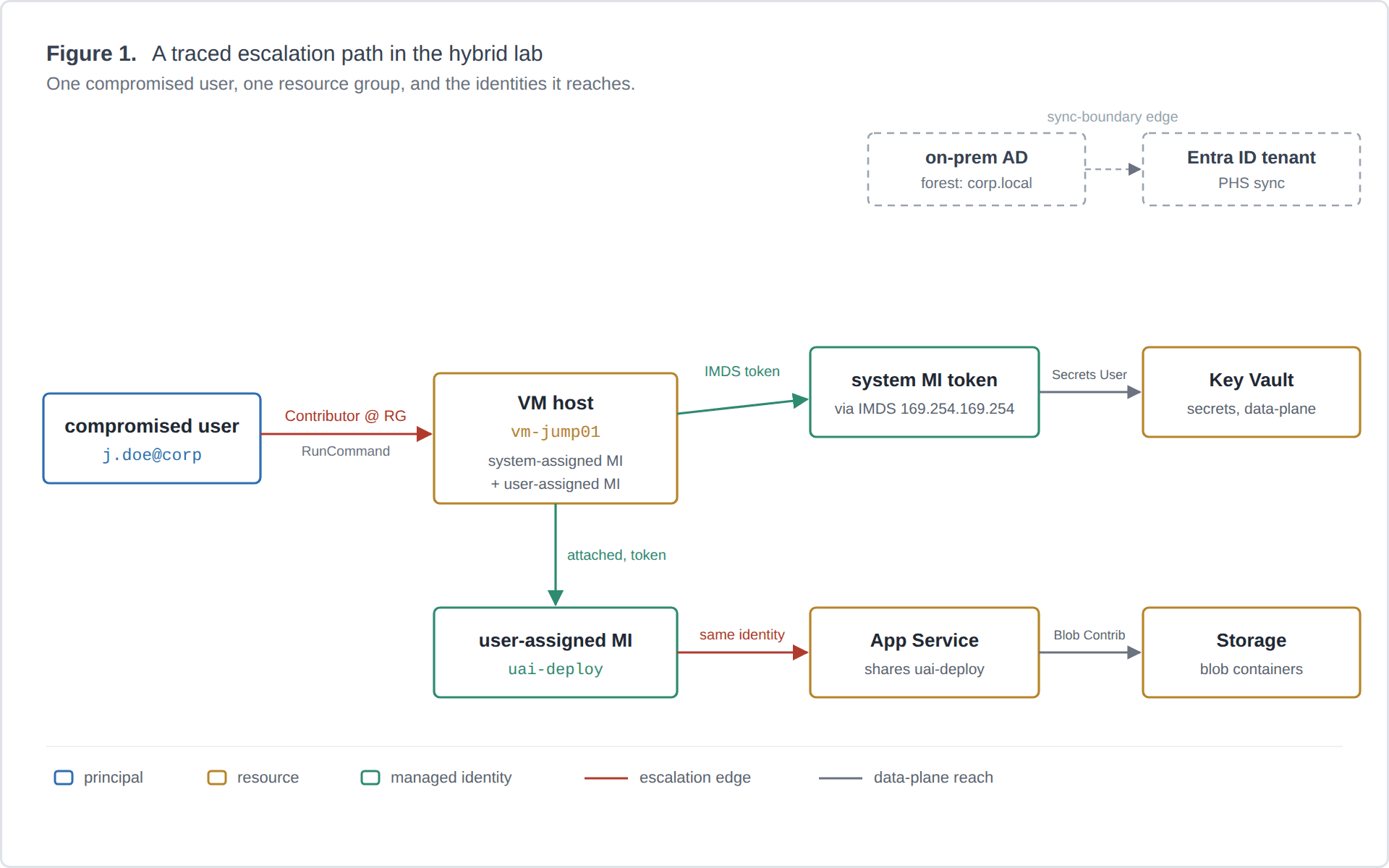
A framework for treating Azure managed-identity abuse in hybrid Entra ID environments as a graph-reachability problem. I define the node and edge types, ground each edge in Azure RBAC semantics, show how my tool Fenrir uses the model to answer one question conservatively, and work through a case study in my own lab. Framework and systematization, not an empirical study.
A walkthrough of Fenrir, a Python CLI I built during a red-team internship that automates the Azure identity attack chain: tenant recon, an exploit-readiness verdict, managed-identity token theft through compute hosts, and tenant-wide post-exploitation.